Overview
Reverse‑engineered the BLE protocol of wireless SMPTE timecode hardware to expose live sync data, pairing behavior, and initialization requirements for custom tools.
Problem
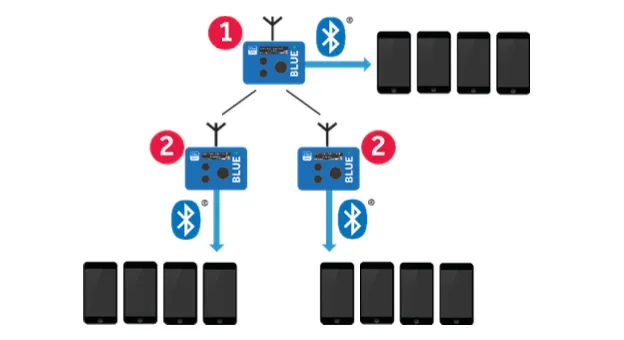
Atomos/TimecodeSystems UltraSync BLUE units support only a limited number of paired devices and provide no official API for custom integrations. The goal was to recover the BLE protocol so third‑party tools could read timecode reliably while respecting the device’s required initialization sequence.
Hardware
- UltraSync BLUE timecode units
- nRF52840 sniffer hardware
- Linux host running Wireshark for BLE capture and analysis
- macOS with the official UltraSync BlueSlate app
- MAX driver boards with 7‑segment displays for low‑cost timecode slates
SMPTE Timecode Overview
SMPTE timecode is a standardized method for labeling individual frames of audio‑visual media with a monotonically increasing address. Rather than representing absolute wall‑clock time, SMPTE timecode identifies position within recorded media using a frame‑indexed format:
HH:MM:SS:FF
Where:
- HH — hours
- MM — minutes
- SS — seconds
- FF — frame number within the current second
The meaning of the frame field (FF) is dependent on the active frame rate, making timecode a rate‑aware addressing system, not a simple timestamp.
Common frame rates include: 23.976, 24, 25, 29.97 (drop‑frame / non‑drop), and 30.
In drop‑frame modes (notably 29.97 DF), frame numbers are periodically skipped to keep timecode aligned with real elapsed time. As a result, correct timecode reconstruction requires knowledge of both the frame rate and the drop‑frame state.
Importantly, SMPTE timecode does not prescribe how timecode is transported—only how it is represented.
Timecode Representation vs. Transport
SMPTE defines the representation of timecode (HH:MM:SS:FF and its frame‑rate semantics), but not the transport mechanism used to deliver that information between devices.
Common transport methods include:
- LTC (Linear Timecode) — an audio waveform encoding SMPTE timecode
- VITC — timecode embedded in video signals
- Metadata channels — proprietary or standardized digital transports
- Wireless packetized transports — including Bluetooth Low Energy (BLE)
The Atomos / Timecode Systems UltraSync BLUE does not transmit LTC audio. Instead, it broadcasts timecode state using a proprietary BLE protocol. These BLE messages do not themselves constitute SMPTE timecode; rather, they contain the state required to reconstruct SMPTE timecode on the receiving device.
This distinction is critical: BLE acts as a transport layer, while SMPTE timecode remains the logical representation reconstructed by the receiver.
Converting BLE Messages into SMPTE Timecode
The UltraSync BLUE transmits periodic BLE notifications containing a snapshot of timecode state, including hours, minutes, seconds, frame index, and frame‑rate configuration and status flags.
Each BLE message represents a discrete state update, not a continuous signal. As a result, reconstructing usable SMPTE timecode requires additional logic on the receiving device.
The reconstruction process follows four conceptual steps:
- State acquisition — Each BLE notification is parsed to extract the current SMPTE components (HH, MM, SS, FF) and frame‑rate metadata.
- Local timestamping (jam point) — Upon receipt, the receiver records a local monotonic timestamp. This establishes a "jam" reference: at local time T, the master timecode state was X.
- Forward timecode generation — Between BLE updates, the receiver advances timecode locally by incrementing frames according to the active frame rate, handling frame, second, minute, and hour rollovers, and applying drop‑frame rules where applicable. This mirrors how a traditional LTC‑based device free‑runs between jam events.
- Latency compensation — BLE introduces a small but consistent transport delay. To ensure visual alignment (e.g. a slate display matching camera timecode at the clap frame), a fixed frame offset is applied during reconstruction.
In effect, BLE notifications are treated as periodic jam sync events, and SMPTE timecode is continuously regenerated from those events using a frame‑accurate local model.
Implications for Third‑Party Displays
Because BLE provides state snapshots rather than a continuous waveform, reliable third‑party timecode consumption depends on:
- Correct initialization and pairing behavior
- Proper sequencing of characteristic reads prior to subscription
- Accurate frame‑rate handling
- Deterministic local timecode generation
- Explicit compensation for transport latency
When these requirements are met, BLE‑transported timecode can be rendered frame‑accurately and remain visually consistent with wired LTC‑based systems, enabling reliable digital timecode displays and low‑cost slate implementations without requiring an onboard timecode generator.
Protocol
Identified the custom timecode service UUID, primary notify/read characteristic, and the frame count/config channel required for reliable initialization.
| UUID | Purpose | Properties |
|---|---|---|
9383b854-8bee-11e7-bb31-be2e44b06b34 |
Timecode Service | — |
9383b110-8bee-11e7-bb31-be2e44b06b34 |
Primary Timecode | notify, read |
9383b110-8bee-11e7-bb79-be2e44b06b34 |
Frame Count / Config | read, write |
ce8dadf8-b7e0-4d9e-94cd-43f84803b361 |
Secondary Timecode / Status | notify, read |
0252db82-f8a8-4874-b5cd-e65b7b3309b9 |
Status / Sync | notify, read |
Manual Reference
Initialization Sequence
- Read frame count/config characteristic.
- Read device name.
- Subscribe to primary timecode notifications.
The official app fails to read timecode reliably unless the frame count characteristic is read first.
Tools & Methods
- BLE discovery and live notifications with Python (Bleak).
- Packet capture via PacketLogger/Wireshark and macOS logging.
- Frida hooks to monitor outgoing BLE traffic from the UltraSyncBlueSlate macOS app and extract UUID usage.
- Binary analysis of the vendor app to map UUIDs and init sequences.
Key Technical Challenges
- Proprietary pairing handshake — Decoded a custom 3-way handshake (CCID, BCID, Accept) with no documentation by testing all writable characteristics and analyzing 150+ pairing attempts across multiple tools.
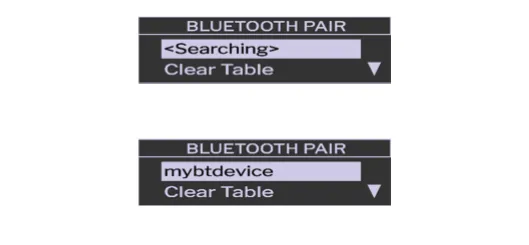
- State-dependent behavior — Found that the UltraSync Bluetooth menu must be open during pairing for devices to appear, and that timecode streaming is limited to 10 packets unless properly paired, requiring precise connection timing.
- Hidden protocol semantics — Determined that the device name shown in the UltraSync menu is stored in a custom CTRL characteristic (0x000F), not in BLE advertising or Generic Access, after exhaustive testing of 15+ characteristics.
- Platform-specific BLE limitations — Worked around macOS CoreBluetooth restrictions where peripheral device names cannot be customized, affecting how UltraSync identifies connected devices.
- Race conditions in pairing — Early BCID reads returned all zeros due to timing issues; added retry logic and delays to reliably read the 4-byte persistent identifier before timeout.
- Incomplete protocol implementation — Achieved ~90% success with working pairing and continuous timecode reception, but device names still don’t display in the UltraSync menu despite being stored, suggesting additional undocumented validation steps.
Outcome
The resulting spec enables reliable timecode reads and custom integrations without relying on the official app, while preserving proper initialization and pairing behavior.
It also makes it possible to build inexpensive digital timecode slates using off‑the‑shelf Bluetooth receivers, 7‑segment displays, and MAX driver boards to show frame‑accurate timecode.